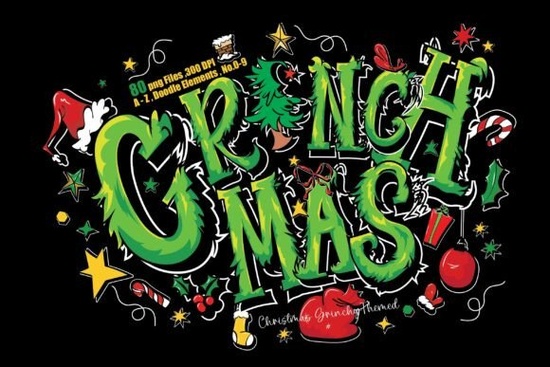
If you are putting together Grinchy-themed holiday cards, T-shirts, or party invites this December, the Grinchmas Font from Creative Fabrica can add that playful, hand-drawn touch you need. But before you download, you should know that this is not a traditional OTF or TTF font. Instead, it’s a collection of high-resolution PNG files uppercase letters, numbers, and fun doodle elements all with a transparent background. That detail matters a lot for how you use it, and we’ll cover exactly what you can do with this cheerful Grinch letter set.
Is the Grinchmas Font actually a font?
No, it’s a set of individual PNG images. Each letter, number, and doodle comes as a separate file. So you don’t install anything. Instead, you drag and drop the letters into your design software like Canva, Photoshop, or Procreate and manually arrange words. This gives you full control over spacing, rotation, color overlays, and layering. The transparent backgrounds make it easy to place them on any colored surface. If you’ve used other PNG letter packs, this works the same way.
What’s included in the download?
The download arrives as three ZIP files containing 80 ready-to-use PNG files. You get:
- Uppercase A–Z (26 files)
- Grinchmas decorative elements (26 files)
- Doodle elements like holly, stars, and hand gestures (16 files)
- Numbers 0–9 and common punctuation symbols (! and ?)
Everything is saved at 300 dpi, so the details stay crisp even when you scale them up for print. The transparent backgrounds let you layer the letters over any color, photo, or pattern without a white box.
Who is this set for?
Designers who create party invitations, sublimation crafts for t-shirts and mugs, sticker makers, scrapbookers, and small business owners who sell holiday-themed POD products will love this pack. If you run a print-on-demand shop, you can use the letters to spell out quotes and combine them with the included doodles for unique designs. Hobbyists and DIY crafters can print the letters and cut them for handmade banners or cards. It’s also great for last-minute holiday social media graphics just pop the letters onto a festive background.
How do you arrange the letters into words?
Because each character is a separate PNG, you need to place them one by one. Most design apps have alignment and distribution tools that speed this up. In Canva, you can drag the letters, resize them proportionally, and use the position tab to space them evenly. In Photoshop, the align and distribute functions work the same way. It takes a little more time than typing with a font, but the payoff is a completely custom, hand-lettered look that no standard font can replicate.
What about commercial use and selling designs with these letters?
The license included with this purchase generally allows you to create physical products for sale like t-shirts, mugs, and printed posters as long as you use the letters to form words or phrases and combine them with other elements. You cannot resell the PNG files as-is or offer them as editable templates. The product description says you can “create your own words/phrases for commercial use” and “use clipart to print on items for sale,” which covers most small business needs. If you design digital prints or sublimation transfer sheets, you can sell those containing arrangements of these letters and doodles. A “Merry Grinchmas” wall art print or a set of holiday throw pillow mockups are both allowed. Always export your final designs as flattened files, not with the individual PNG layers still intact.
What are some project ideas for the Grinchmas letter pack?
- Custom party invitations with phrases like “You’re a mean one, Mr. …”
- Iron-on decals for matching family holiday shirts
- Scrapbook titles or journal cards
- YouTube thumbnail text for vlogmas videos
- Printable stickers or gift tags using the doodle elements
- Window clings or seasonal menu boards for cafés
- Greeting cards that pair the letters with the included hand-drawn elements
- Social media posts promoting December sales
If you like alternating between holiday themes, our look at a dripping, messy letter pack for Halloween shows how similar playful letter styles work across seasons.
Are there any limitations to keep in mind?
The main one is that you cannot type with it. If you need quick text formatting across multiple projects, a true color font or SVG font might be faster. But for a handful of headlines or design elements, the manual placement is manageable. Also, because the letters are pre-colored green with textures, you can’t easily change the color without using blending modes or clipping masks something possible in Photoshop but not with a single click. The set includes only uppercase letters, so it works best for short slogans or titles, not long paragraphs.
How does this compare to other Grinch-themed resources?
There are genuine Grinch-style fonts available, but many require special licensing for commercial use. This PNG pack gives you a complete illustrated alphabet with quirky details and bonus doodles that you might otherwise need to draw yourself. If you’ve ever tried to find a royalty-free Grinch hand lettering style, you know it’s tricky. The Grinchmas letter bundle fills that gap safely by giving you a whole mini-library of themed items.
Quick-start checklist for your Grinchmas PNG letters
- Unzip the three folders and keep the letters, elements, and doodles organized in separate folders on your computer.
- Open your design canvas at 300 dpi for print (or 72 dpi for digital-only) and set your background color or image first.
- Drag the letters you need and use the alignment guides in your software to space them evenly.
- Overlay a doodle element on the first or last letter, or fill empty corners with stars and holly.
- Apply a subtle drop shadow to all letters and elements to help them pop off the background.
- Group all layers before resizing or moving the word to keep spacing intact.
- Export as a high-quality PNG or PDF, and double-check the license terms if you plan to sell the finished design.
One last tip: before starting a paid client project, test a few letters at your intended print size to make sure the green details and edges stay sharp this ensures your final product looks as good printed as it does on screen.
Learn More Slime Drip Halloween Font: Design Inspirations & Ideas
 Roadscript Font: Unleash Creativity in Your Typography
 Kimily Font: Creative Typography for Modern Design Projects
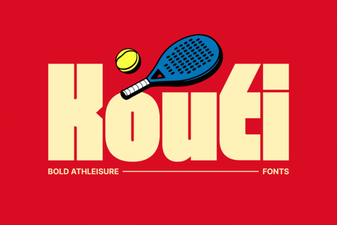 Kouti Font: Fresh Design Ideas for Your Next Project
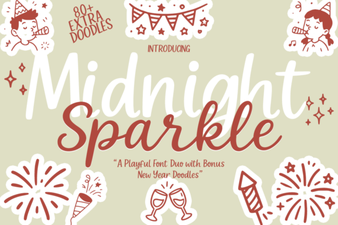 Midnight Sparkle Duo Font: Description & Design Ideas
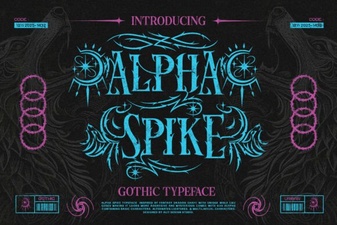 Alpha Spike Font: Bold Geometric Typeface for Modern Design